


Word City: Connect Word Game
4.84.57K Reviews
App Specs
- Version
- 4.2.40
- Updated On
- License
- Free
- Downloads
- 5,000,000+
- Developer
- Unico Games Studio
- Categories
- Word
- Platform
- Android, iOS
Screenshots
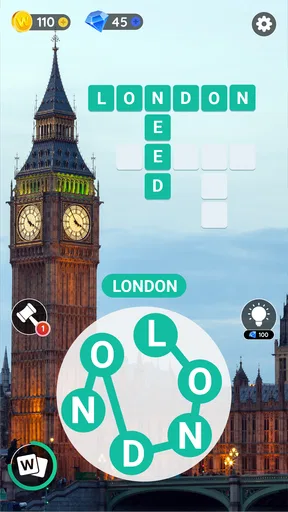
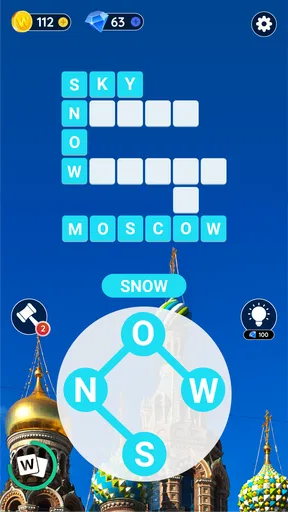
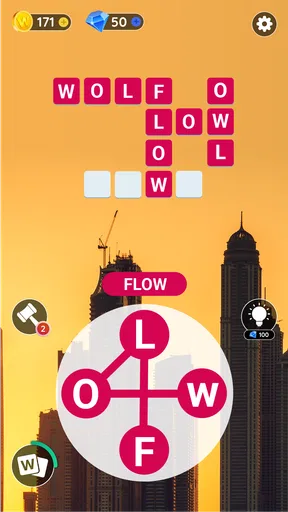
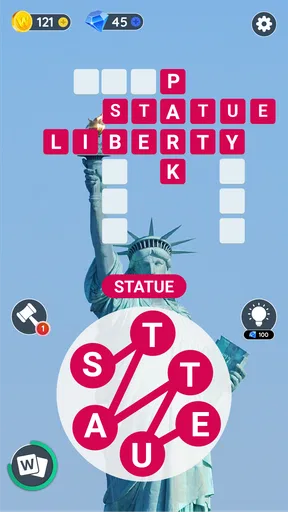
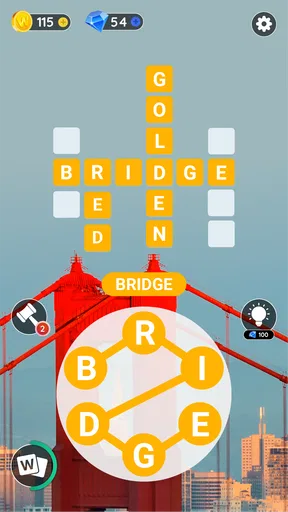
 Analysis by AppCompare
When I choose a word game, I care less about a grand theme than about whether I can understand the puzzle at a glance, make progress in a short break, and put it down without losing the thread. Word City: Connect Word Game is built around forming words from connected letters, with crossword-style puzzles that give that simple action a clear goal. It suits the familiar middle ground between a quick word search and a more demanding crossword: you work with a small set of letters, but still need to think about which answers the puzzle expects.
That focus makes it an easy game to sample rather than a commitment to a long session. I can picture opening it while waiting for a ride or taking a quiet break, trying a few combinations, then stopping when I need to move on. Its appeal depends on enjoying that repeated cycle of spotting possibilities and checking whether they fit, not on wanting a story-heavy game or a large set of different activities.
What I look for in a letter puzzle
A useful word puzzle should make the rules clear while leaving enough room for discovery. This one gets its basic idea across quickly: connect letters, make words, and solve the board. That low barrier is a real advantage when I want something calm and self-contained, especially compared with traditional crosswords that may ask me to know a clue, a name, or a fact before I can get started.
The trade-off is that letter-combination games can become a test of vocabulary and spelling as much as reasoning. If a word does not come to mind, trying more arrangements may feel less like solving and more like guessing. I’d approach a stubborn board by first finding the obvious short words, then looking at what letters remain and testing less familiar combinations. That small change in method is often more useful than repeatedly shuffling through the same guesses.
Getting Started with Word City
First things first, downloading and installing Word City: Connect Word Game was a breeze. Available on both Android and iOS, the app's user interface is clean and intuitive. No complicated menus or endless tutorials – just jump right into the game. Perfect for those moments when you just want to unwind with a little mental exercise.
Word City is a free word game from Unico Games Studio. It has a 4.8 average from around 201,000 ratings, and has been installed over 5 million times. Those figures suggest that it has found a substantial audience, though popularity alone cannot tell you whether its particular puzzle rhythm will suit you. I’d judge it by whether you enjoy working through connected-letter boards, rather than expecting it to replace every kind of word game.
It is rated Everyone, which makes the basic word-puzzle format approachable for a broad range of players. The game was released on December 13, 2017, and its current version is 4.2.38, with Android 7.1 as the minimum operating system. It is free to start, with optional in-app purchases priced from $0.99 to $49.99 per item. I’d treat those purchases as optional extras, not as a reason to spend: try the free experience first and decide whether any paid option would genuinely improve your own play.
Worth Reading Before You Choose

Flipboard Shows What News Apps Must Do Beyond the Feed

Switching to Android Auto Means Rethinking Your Driving Routine

Google Calendar Makes a Crowded Week Easier to Manage

Ludo King Makes the Most of the Minutes Between Plans

Baby Panda World Brings Quick Play to Modern Phones, but Its Game Library Feels Busy

ESPN’s Live Game View Makes Following Close Games Easier
The Gameplay Experience
Once you start, you’ll find yourself in a beautifully designed cityscape, where each level represents a new challenge. The game is all about connecting letters to form words, and let me tell you, it’s oddly satisfying. The levels start off easy, but as you progress, they get trickier and trickier, keeping your brain on its toes.
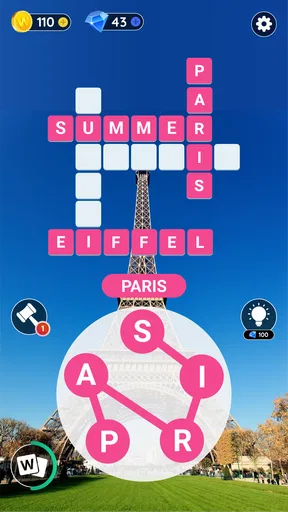
The app offers hundreds of levels, each with its own unique twist. Some require you to find a set number of words, while others challenge you to discover specific hidden words. It’s the kind of game that makes you feel smart when you crack a tough level. And who doesn’t love feeling like a genius?
That variety in what a board asks of me changes how I tackle it. When the goal is to fill the expected answers, I focus on completing the visible puzzle; when hidden words are involved, I’m more inclined to test extra combinations instead of stopping as soon as the obvious task seems done. A practical habit is to pause after finding a few answers and inspect the letters again from a different starting point. It helps avoid tunnelling on one familiar word pattern.
For a realistic short-break routine, I’d play one or two boards while a kettle boils or during a wait, then leave the game when the break ends. The simple central action makes that easy, and the changing board goals give each attempt a reason to feel distinct. If I were playing with a child or a less confident speller, I’d keep the mood exploratory: try words aloud, talk through possible endings, and use a hint only after genuine effort rather than turning every board into a speed test.
Features That Stand Out
Now, let’s talk about some of the standout features. One thing I really appreciated was the daily challenges. These are fun little tasks that offer rewards upon completion. They’re a nice touch, giving you a reason to come back every day.
Daily tasks can be a pleasant routine, but I wouldn’t let them dictate when I play. If I only have a minute, I can treat the challenge as a small puzzle rather than feeling obliged to complete a long session. That distinction matters for a casual game: the best use is a bit of enjoyable practice, not another daily checklist to keep up with.
The graphics deserve a mention too. The visuals are vibrant and crisp, enhancing the overall experience without being distracting. I also loved the soothing background music – it’s like having a mini zen session while you play.
The relaxed presentation is a good fit for playing alone in a quiet moment, though it is not the reason I’d choose the game over another word puzzle. If I’m somewhere noisy or want to play without sound, the puzzles still make sense as a visual activity; the music is an accompaniment rather than the core of the challenge. For anyone who prefers a stark, paper-like crossword, the city backdrop may feel more decorative than necessary.
Another cool feature is the hint system. Stuck on a tricky level? No worries! You can use hints to help you out. Of course, these are limited, so use them wisely. It’s a neat way to keep the game challenging without being frustrating.
I’d save a hint for a genuine dead end, not spend one just because a word takes a few seconds to surface. Before using it, I’d scan for short answers, check whether a plural or another common ending might fit, and then look at the less obvious letter pairings. This keeps hints meaningful and makes them feel like a nudge instead of a substitute for solving. If you prefer games that let you experiment without any resource pressure, that limited-help approach may be a small irritation.
How it compares with other word games
Compared with a standard word search, this is more about constructing answers from a shared pool of letters than scanning a grid for words already laid out. Compared with a crossword built around clues, it asks less general knowledge and more flexibility with spelling and word patterns. That makes it a useful choice when I want a puzzle I can enter without remembering a particular fact, while still giving me more to do than simply spotting a printed word.
There are clear cases where another format will fit better. I’d choose a clue-led crossword if I wanted to stretch general knowledge or work through a more varied set of clues. I’d pick a conventional word search if I wanted something very visual and almost mechanical. And if I wanted a broad collection of unrelated mini-games, this focused letter-connection format would not be my first choice. Word City’s strength is staying close to one central activity and varying the puzzle goal around it.
Who will enjoy it, and who may not
I’d recommend it to casual players who like rearranging letters, appreciate gentle progression, and want a puzzle they can play in brief sessions. It can also work for someone building confidence with word games because the core action is easy to grasp, while later boards give that familiar action more of a challenge. The daily challenges may appeal if a recurring small goal helps you return, but they are not essential to understanding why the game works.
I’d steer away from it if you dislike trial-and-error word puzzles, want a strict logic game with no vocabulary element, or expect a deep narrative to carry you from one level to the next. It may also frustrate players who want every accepted answer to come from a clue rather than from exploring possible words. The best match is someone who enjoys the satisfying moment when a set of letters suddenly resolves into a word.
Why I Keep Coming Back
I have to say, what keeps me hooked is the game’s ability to balance relaxation with brain training. Whether you’re looking to unwind after a long day or sharpen your vocabulary skills, Word City: Connect Word Game offers the best of both worlds.
The game also runs smoothly without any annoying ads popping up every few seconds, which is a huge plus in my book. Nothing disrupts a good gaming session like constant interruptions, right?
For me, the strongest reason to return is the low-friction format: I can understand the board, try a few ideas, and stop without needing to set aside a full evening. The main limitation is the flip side of that simplicity. If the letter pool keeps leading me toward the same kinds of guesses, the experience can feel repetitive, and the hint supply makes it worth being patient rather than tapping for help at the first pause.
Switching from another word game is easy in one sense: the basic activity is immediately familiar, so there is little to learn before playing. What you give up depends on what you currently use. A clue-based crossword may offer more varied prompts; a word-search game may feel more direct. I’d keep this one as a complementary option for short, relaxed sessions rather than assuming it has to become my only word game.
Final Thoughts
So, would I recommend Word City: Connect Word Game? Absolutely! It’s a fantastic way to challenge yourself while enjoying some downtime. The combination of challenging puzzles, beautiful graphics, and relaxing music makes it a must-try for any word game lover.
Whether you’re a seasoned wordsmith or just looking for a fun way to pass the time, this app has something for everyone. So go ahead, give it a try, and see if you can conquer the city one word at a time!
My practical recommendation is to start with the free version, play enough to see whether the letter-based solving feels satisfying, and use hints only when a board has truly stopped moving for you. If you like short puzzles with a calm presentation and don’t mind relying on vocabulary and experimentation, it is an appealing pick. If you prefer clue-rich crosswords, broad game collections, or puzzles with no guessing element, another format will probably suit you better.
Pros
- Engaging puzzles keep your mind sharp.
- Variety of levels to challenge all skill levels.
- Smooth and intuitive user interface.
- Offline play available for on-the-go fun.
- Regular updates with new content.
Cons
- Ads can be intrusive at times.
- Some levels may feel repetitive.
- In-app purchases can be pricey.
- Limited hints without spending coins.
- Occasional lag on older devices.
FAQs for Word City: Connect Word Game
What is Word City: Connect Word Game?
Word City: Connect Word Game is a word puzzle app that challenges players to connect letters and form words. It's designed to enhance vocabulary and cognitive skills through engaging word puzzles. Available for both Android and iOS, the game offers a relaxing yet stimulating experience for word enthusiasts.
How do I play Word City: Connect Word Game?
To play Word City, you need to swipe letters in any direction to form valid words. The game starts with simple puzzles and gradually increases in difficulty. With thousands of levels, players can enjoy a continuous challenge, discovering new words and improving their language skills along the way.
Are there any in-app purchases in Word City?
Yes, Word City: Connect Word Game offers various in-app purchases. These purchases can include things like hints, which help players find difficult words, or packages that unlock additional levels. While the game is free to download and play, these purchases enhance the gaming experience by providing additional resources.
Is Word City suitable for all age groups?
Indeed, Word City is designed to be accessible and enjoyable for all age groups. Its simple interface and varying levels of difficulty make it suitable for children, teenagers, and adults alike. It's a great tool for anyone looking to improve their vocabulary and cognitive abilities in a fun and engaging way.
Does Word City require an internet connection to play?
Word City: Connect Word Game can be played offline, making it convenient for users who want to enjoy the game without an internet connection. However, certain features, such as leaderboards and daily challenges, may require an internet connection to update and function properly.


